Tech writing and UX - Collaborate together for success (Pt 1)
Introduction, and why should you care?
I'm going to talk in this blog about how Technical Writers and UX Designers can work together to get better user outcomes; how their goals can overlap; and how their business success (read: monetary goals) ties together.
But, before that, why would you want to collaborate with different roles anyways? Why try something new and give your time to help the success of another group? Putting aside lofty, community oriented goals around teamwork, individuals want to:
- Do Good Work
- Look Good Doing It
- Go Home on Time
For UX Designers and Tech Writers, working together allows you to achieve these goals.
- Collaboration between these two roles allows for better work to be done - better copy in the experience, better UI connections to documentation, and better insight into what everything is supposed to do for writers (Do Good Work).
- Cross-functional working gives you more visibility in an organization, which can lead to more leadership experience and a positive perception (Look Good Doing It).
- Finally, by utilizing the strengths of the other role to improve your own work, and establishing useful artifacts and lines of communication, you can turn deliverables around more quickly (Go Home on Time).
A content designer colleague at Red Hat covered this from another angle in a post from 2021 - If you are interested in this topic I recommend opening that in another tab to read as well! 😄
Now let's dive into how you might go about doing this collaboration.
Level-setting, or, why we may not work together already
A multi-functional product team has many roles, with different focuses.
UX designers (along with other UX roles such as researchers, developers, and writers) are responsible for the usability of the product, the user interactions, the microcopy, and understanding user needs; so that people can use and understand the product effectively.
Technical writers are responsible for the documentation of the product being complete, actionable, and clear; so that people can use and understand the product effectively.
Both of these roles have user success in common. They also have business metrics in common, such as reducing hands-on support. But, the position of these roles in orgs can sometimes make collaboration difficult. e.g. Reporting to different areas of the org; being (or not being) in a Product Trio; or just working at completely different cadences.
After being a B2B Enterprise UX designer for 12+ years, and not appreciating the collaboration between these two teams at all, I had a Technical Writer reach out to me and ask: "How can I help?". And that has led to huge improvements in the quality of the experiences me and my team deliver.
Collaboration between Tech Writers & UX Designers
There are (at least) four areas where collaboration can be exceptional.
- Know Before You Go - Use UX artifacts to get previews of upcoming features and functionality
- Sharing is Caring - Share documentation metrics to help target troublesome parts of the user experience
- You're Good with Words, Right? - Collaborate on microcopy and UI writing
- Help You Help Yourself - In-application help and interactions can help users before they go to documentation.
Know Before You Go
Use UX artifacts to get previews of upcoming features and functionality.
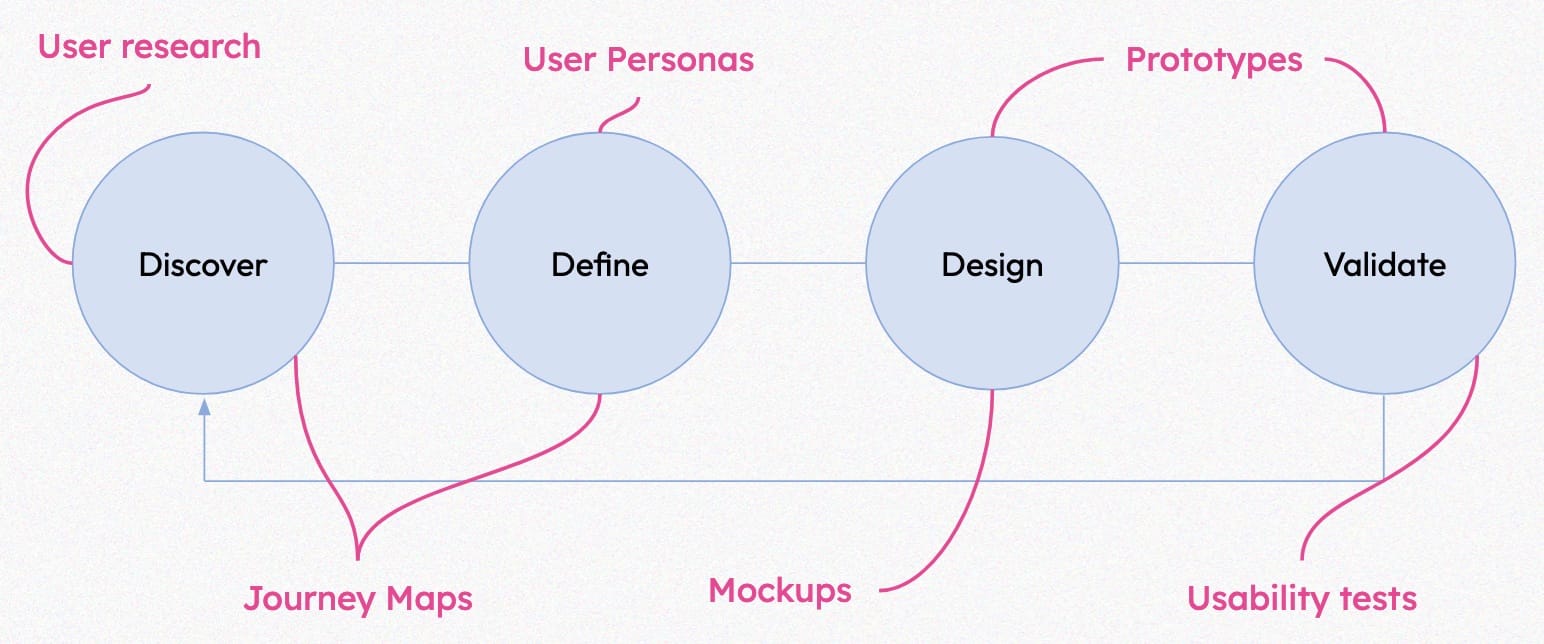
UX (ideally) works at the beginning of the product lifecycle - while user needs, features, and interactions are being defined. It is not unusual for UX work to sit for weeks to months while development works toward making the final product. Which means that before anything is even built, the UX team has a lot of information about features that are coming down the line.
This process creates a lot of artifacts. And these artifacts describe why things are the way they are, what users are trying to achieve, and how exactly it is meant to be implemented – all data that is useful when writing the accompanying documentation.
Even with complete user stories from Product Management (PM), these artifacts can help fill in a full understanding of what a feature or product is trying to solve, and why a user might be trying to do it. And usually, they are just sitting there waiting to be read!
As a Technical Writer, I encourage you to reach out to the UX Designers associated with your products and ask for copies and links to their artifacts. It takes almost no time to share these things (they already exist!) and there is a ton of potential to learn from these items.
Artifacts - What they are, and what can you expect to learn from each
Expand each item for more information on different UX artifacts, or just skip this and continue reading (you can always come back! 😄)
💬 User Research
This is:
- Research done by UX team to identify the key needs and pain points for target users
- The results can inform product direction
- Examples: Top tasks | Competitive analysis | Generative interviews | Outcome analysis
- Research can also occur after a design is made, or even after it has been developed - see more about Usability Testing below.
You can learn:
- Audience of product/feature
- Pain points & key needs
🧑 User Personas
These are:
- Definitions of the target users
- Distilled user research
- Identify key needs and tasks
You can learn:
- Audience of product/feature
- Pain points
🗺️ Journey Maps
These are:
- Diagrams of the user’s path through multiple features to achieve their goal
- Can be high level (low-fidelity) or very detailed (high-fidelity)
- Often include user emotions & thoughts, but not required
You can learn:
- Workflow
- Documentation need - High/Med/Low
🎨 Mock-ups and Prototypes
These are:
- Deliverables to PM & Eng that illustrate how interactions work; how the screen should be arranged; and how users use the feature or product
- Can be high or low fidelity
- Prototypes can be mocks or code
You can learn:
- The UI which engineering is building... before its in code
🧪 Usability tests
These are:
- Methods of testing interactions with users to see if they are usable.
- Can be with mocks/prototypes or with implemented code
- Consists of scripts & task paths; the test; and the results
You can learn:
- Scripts can give context to how interactions work
- Results can indicate where users may need more help
Sharing is Caring
Share documentation metrics to help target troublesome parts of the user experience
Ideally, all roles would have access to the metrics that are useful to them. But in actuality there are divides between who has access to what, and how.
With shared metrics, there are possibilities to:
- Detect what workflows need additional attention from a UX or Documentation standpoint
- What documentation articles are accessed the most? How does this align with what workflows are used the most? By comparing these two you can discover gaps
- Determine if in-app help is necessary; or enhancements to existing docs
- Look at funnel completion rates for where people drop off and look to improve documentation for those steps
- And, measure success – Something both Technical Writers & UX Designers both rate as a desire for their role – by looking at metrics across the touchpoints.
- Compare before and after metrics after making changes. Do published changes in docs have an effect on completions or conversions?
This post is long, so I've split it into 2 parts for readability. I hope you join me for Part 2.
In Part 2 we will dive into these specific ways of collaboration:
- You're Good with Words, Right? - Collaborate on microcopy and UI writing
- Help You Help Yourself - In-application help and interactions can help users before they go to documentation.
See you there!
Also" A content designer colleague at Red Hat covered this from another angle in a post from 2021 - If you are interested in this topic I recommend opening that in another tab to read as well! 😄